kirkcudbright: (piratebot)
Someday I'll get back to doing regular updates. For now, random thoughts, not even the most important ones.

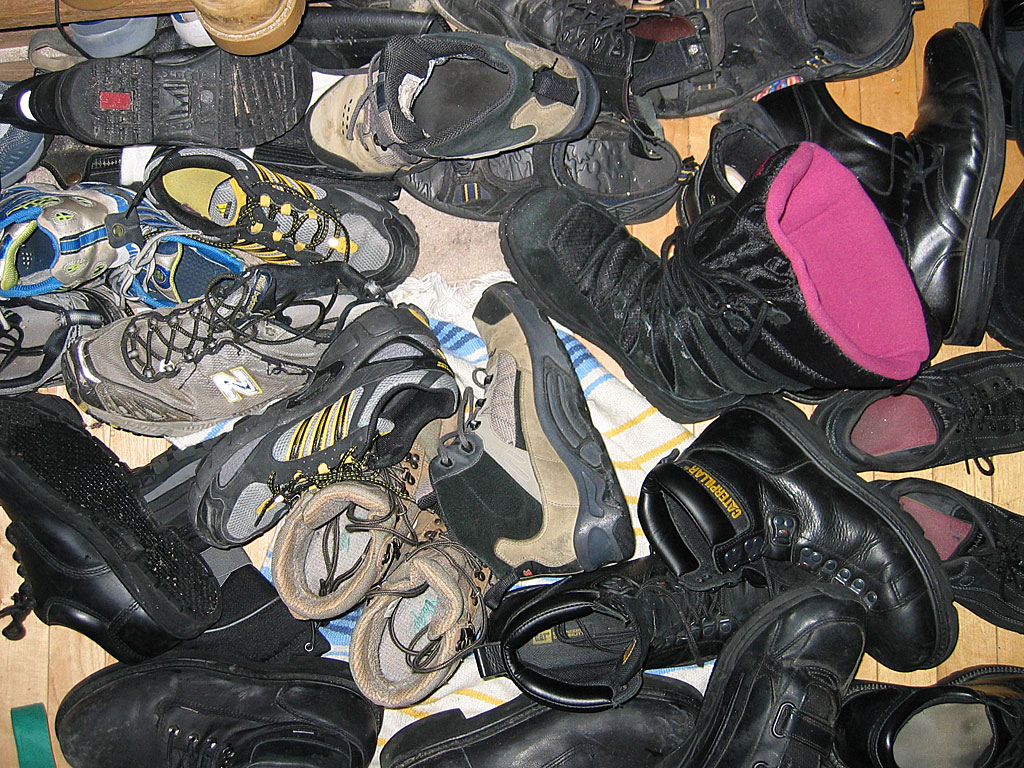
I gave blood at Arisia. I usually give to Children's Hospital, but since they moved their collection from Sunday to Friday, and since we had a hella time getting to the hotel (fuck you very much, Auto Show, on top of normal rush-hour traffic), I gave on Saturday to Mass General. But that's not the point of this, which is when the intake nurse took my blood pressure and pulse, found them kind of low, and asked if I was feeling okay, or was I just athletic, and I said "I'm a runner". And the point of this is: when did I cross the line from "I run" to "I'm a runner"? When I signed up for my first marathon? When I actually did it? When I signed up for my second marathon?

Also, when I got to Arisia, I almost immediately went into post-con crash, where I was like "I've worked so long and so hard for this, and now it's here, which means it's almost over, and I'm already missing parts of it, and I can't possibly Do It All, Aieeee!" Eventually I had drinks with friends, and got over that. But damn, that gets me every time.

Also at Arisia, I was(?) recruited(?) to do...something(?) for MidAmeriCon, the 2016 Worldcon in Kansas City. The first conversation was with Geri Sullivan, a graphic designer who I admire and respect infinitely, and whose approval of my work means more than you can possibly know. (And who will probably never do any design work for Arisia, alas.) But she introduced me to the co-div-head for KC, and we had a feeling out/bitch session during the crispy hours of Monday afternoon. Either nothing will come of it, or (more likely) I'll have more unpaid work. (The other co-DH is someone I worked with on the Montreal worldcon.) So, yay?

Tangentially, I've realized over the years that Worldcons may be bigger and more complicated than regionals like Arisia, but they don't necessarily do a better job of it. To begin with, each Worldcon is a one-off, so they don't always learn from their mistakes, despite having a substantial overlap of senior staff. Plus, they don't have their own stuff, whether it's Art Show framing and pegboard, or A/V equipment, or even Ops radios. At best, it's a pot-luck. At worst, everyone brought potato salad, and no one brought plates. Anyway, I was telling Keri about sending my first Souvenir Book to press, worried that I'd made a ConDigeo level of blunder [looking back, 10 years later, it's still a fine piece of work, thankyouverymuch], and she was bitching about LoneStarCon, which never settled on a single logo, but had two logos that were used haphazardly, depending on who was producing what piece. But she's got a style sheet for KC, which makes me very happy.

What else makes me happy? Relationships that somehow haven't exploded into fiery bits. Friends who somehow aren't dead yet. Parents who same. File under "Fail to Suck."

pocket

Jan. 6th, 2010 08:42 pm
kirkcudbright: (pubs)
One thing I've been doing lately is assembling the Arisia Pocket Program (pdf and html here). csv + perl + InDesign = awesome, or at least useful. Srsly, I can say without undue conceit that this is a pretty fine template for what a pocket program can and should be.

I want to do it again next year, and then I might be willing to hand it off to someone else. The first time I did the pocket program, my goal (as when I took on the souvenir book) was to Suck Less(tm) than the previous guy. (Of course, he'd set the bar pretty low.) So who's going to suck less than me? I really want to see that.
kirkcudbright: (pubs)
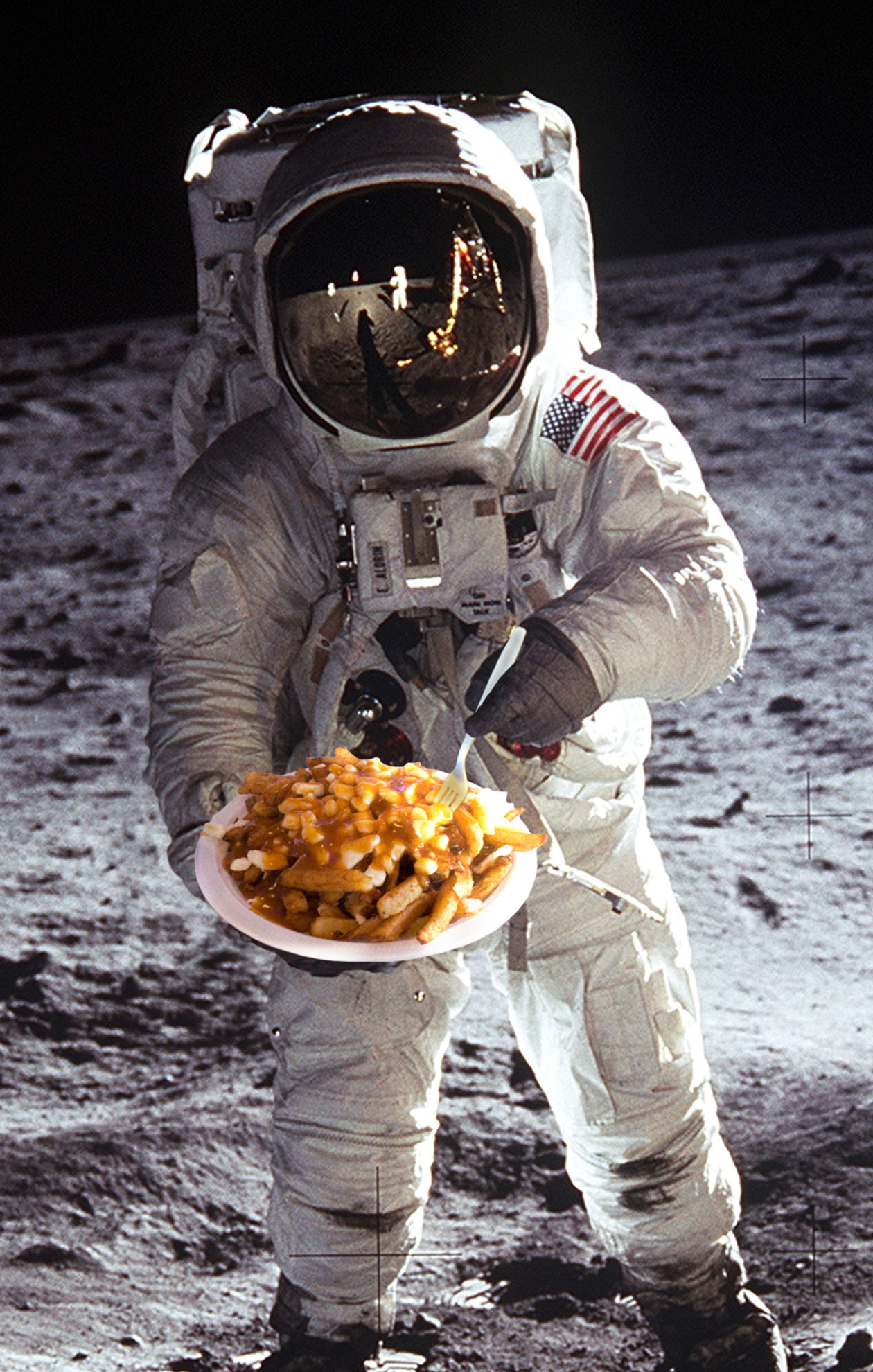
One of my side projects has been to lay out the Worldcon Restaurant Guide. Jo Walton did the vast majority of the research and the writing over in [livejournal.com profile] antici_food, and I just had to make it look pretty and polished.

For the cover, I had a vague idea about borrowing [livejournal.com profile] sunspiral's Hugo rocket, and insinuating that into one or more table settings, but the concept never gelled, and circumstances conspired against my actually getting ahold of the rocket. But while idly googling photos of Montréal restaurants, I kept coming on pics of poutine, and I knew what I had to do.


And now I have to try the stuff myself...

press baby

Feb. 28th, 2008 09:02 pm
kirkcudbright: (pubs)
This morning's class on File Basics for Poster and Display Printing turned out to be pretty...basic. It was pretty much a checklist of the 5 most common problems that would cause a printer to bounce your job.

Ambit Press Best Practices )

This is all pretty obvious to me going into the class. (It's also general to any print job, not just to large-format.) I guess I know more than I think I know. Do I know enough to get a job in this field? I don't know that.

Then the Operations Manager got up to (finally) talk about the various media and mounting choices for large-format printing, and gave us each a swatch of paper, vinyl, banner vinyl, foamcore, sintra board, gator board, and coroplast.

Finally, we got a tour of the plant, from the 54" inkjet to the Docutech laser printers to the offset presses, with examples of typical jobs from each press.

THE REALLY COOL THING, the thing that made my whole day, was that one of the samples for the offset press was the Arisia Souvenir Book. [livejournal.com profile] bridgetminerva take note: he made a point of opening to the inside front cover, and showing off the quality of the ads. W00t!

Afterwards, fabulous lunch with [livejournal.com profile] ceo, [livejournal.com profile] doctordidj, and [livejournal.com profile] tcb.

Then back to Andor to see [livejournal.com profile] electrictruffle and his darling baby boy. Bonus social time with [livejournal.com profile] veek, [livejournal.com profile] ceelove and her darling one, and someone I (probably) had not met before.

OTOH, this had me going home at 5pm, and the traffic on 93 sucked enormous rocks. If it's like this every day, maybe I don't want to work in Cambridge.

style

Feb. 18th, 2008 10:52 pm
kirkcudbright: (pubs)
Tonight I went to my first meeting of the InDesign User Group. The two-hour presentation on "From InDesign to the Web" can be roughly summarized as follows:

1. Styles are good. Seriously, the first hour was a review of paragraph, character, and object styles - how to set them up, how to apply them, how to import them from another InDesign document, and how to map them from Word or RTF documents. Okay, there were people there who weren't aware of the last bit, but even as an amateur designer, I've already gotten the religion of styles.

2. Exporting an InDesign doc to xhtml (a CS3 feature, replacing "Package for GoLive") exports the style names, but none of the style attributes. Granted, the set of web-safe fonts is extremely limited, but it could at least export type sizes, colors, leading, etc. Jesus, Adobe, it's not rocket science.

3. Once you've re-defined all your styles in DreamWeaver, you can create an external CSS style sheet document by cutting and pasting the style code from the html document to the css document. Really. Did no one at Adobe/Macromedia go through the workflow, and say "This is a giant hack"?

pocket

Jan. 8th, 2008 11:08 pm
kirkcudbright: (pubs)
Even after all the time spent on the compooter, there's nothing to make a project real like holding a full-scale mock-up in your hand.


Among other things, I had to do this to prove to myself that the foldout program grid pages would actually work with the page sizes I'd set. There's math and logic, and then there's prototyping.

The fold-outs worked just fine, but I discovered a need to reformat the Friday grid. And sure enough, once I had was leafing through the actual paper, I found a number of niggling typos that everyone had missed on the previous proofing rounds.

So anyway, the Pocket Program is done and delivered to the printer. Read. Enjoy. Feel free to tell me what I got wrong (I've found a couple more typos post-delivery, and I'm aware of some changes to the program), but there's nothing so wrong as to require resubmitting it to the printer.


And then there's this picture I had forgotten taking at our New Year's Day party.


I'm glad we have so many good friends.

souvenir

Dec. 31st, 2007 02:28 am
kirkcudbright: (pubs)
In case you were wondering what I've been up to lately...

The Arisia Souvenir Book is now available for profreading and review at http://www.psgd.org/a08/

Anyone who submits substantive comments gets credit on the staff page, even if you're not normally Arisia staff.

The printer wants it early, and we all know that when a release schedule gets compressed, the first thing to go is the QA. I need all comments by the end of the day (whatever that means to you) on Wednesday 1/2/08.


As an aside, one of the very few places I inject myself into the book (aside from the layout, choice of artwork, etc.) is in the title of the history page. The first year I did it, I wanted to cut some of the more superfluous data, so I titled it "The Complete History of Arisia (Abridged)", which is also a nod to The Reduced Shakespeare Company's "The Compleat Works of Wllm Shkspr (Abridged)". The next year, it was "The Illuminated Illustrated History of Arisia", which is of course derivative of Steve Goodman's song "Vegematic". Last year, it was "Arisia's Will Be That Was", which seemed to confuse some reviewers, but was an homage to a Pogo collection that I grew up with, "Pogo's Will Be That Was".

So the question is what to do this year. "Days of Arisia Past" is predictable but lame. "Arisias I Have Known and Loved" is only slightly better. "All Your Arisia Are Belong To Us" is probably too dated to be cool, but not dated enough to be retro. "All My Arisias Taste Like Snow" sounds like a reference to something, but isn't as far as I can tell.

Anyone have a better idea?
kirkcudbright: (Default)
I had the last class of this semester (Advanced Graphic Design) tonight, and turned in the final project. The nominal assignment was to produce a coffee table book - size greater than 7"x7", not equal to 8½"x11", heavier on pictures than text, minimum length 8-12 pages, printed and bound. I chose to make a book of last summer's [livejournal.com profile] kirkbike bike trip:


This is a photo of the front cover, mostly to show the awesome edge-sewn binding, a traditional Japanese "flax leaf" pattern, from the book I borrowed from [livejournal.com profile] roozle (on the night I crashed the car). NB: Clicking on the pic takes you to the pdf of the full book (28 pages plus covers), rather than to a larger copy of the same pic.

I spent a fairly insane amount of time on this, considering I already had all the pictures and text at the outset. It took a while to do the layout, to massage the pictures and text to fit on a reasonable number of pages. Then I had to edit a bunch of pictures for resolution, color balance, etc. Spent a lot of time fighting over color with printers both at home and work. And I found the last unforgiveable error after I had already bound the book, causing me to re-print the page, and un-bind and re-bind the book.

After we presented our books, the instructor took photos, and collected CDs of our work, but didn't collect the actual books, because she didn't want to be responsible for getting them back to us on an ad-hoc basis (this being the last class). So I have the physical object, and I'll be giving it to my parents for Christmas. I don't expect them to read my LJ, so this will be a nice way to show them what I've been doing, both on the bike and in the classroom.

After the class, the instructor gave me her extra copy of The Packaging Designer's Book of Patterns, a compendious volume of templates for all manner of boxes, cartons, carriers, and all manner of other paper/cardboard packaging. I drooled over this book when we were planning packaging redesign project (which I realize I never posted about - I should do that). Cool, now I have to go and make more 3D stuff out of 2D materials.

Speaking of 3D stuff out of 2D, one of the other students made a pop-up book for this project. It was very cool, and had an even better binding job than mine (padded leather covers). The other 4 students frankly had rather lame bindings, ranging from snap-rings to nylon cord.

And that's the thing, and that's the reason I'm getting an A in this class - if it's worth doing, it's worth doing to excess. Well, yes and no, but mostly yes. I've never made a dime off of design work (in fact, I've spent several thousand dollars in tuition so far), but I have professional pride. I treat everything as a portfolio piece, and I want it to be as good as I can make it, not just good enough for a grade. I'm not entirely satisfied with the photo edting in this book - the printer tended to over-saturate the reds, and over-darken the shadows (esp noticeable in the prints of pp 13, 23, and the back cover) But it 's good enough for the audience - me, the instructor, and my parents.
kirkcudbright: (rooster)
For better or worse, the graphic design assignment is Done, and has only to be presented tomorrow night.


I originally thought I'd be tracing this all out in Illustrator, but it quickly became apparent that it would be easier, and nicer/messier, in Photoshop.

I started with a little gif of a 10-foot U-Haul truck, scaled it up, tightened and smoothed the lines, and did a little manual touch-up. Kermit is from a still from one of the movies, cropped and extracted, and processed with the Stamp filter. Add some text, and copy the whole thing onto transparency. That's the easy part, and the end of the digital part.

We use a photo-transfer method to make the screen. First coat the screen with photo-sensitive emulsion, and let it dry in a dark room, or inside a cardboard box, or both. If the emulsion is allowed to contact the box, it will stick to the cardboard when it dries, and you'll have to scrub out the emulsion, and start over. Hypothetically.

When it's dry, put the transparency with the design on the photo-sensitized screen, add a sheet of glass to keep it flat, and set it under a 150 watt light for 45 minutes. The emulsion that's exposed to the light will harden, while the emulsion under the black area of the transparency will remain soft, and can be washed out, with a little light scrubbing from a toothbrush. However, if the reflector concentrates the light in the center of the image, it can get overexposed, even under the black part of the transparency, and it can be an unholy bitch to clear out that part of the screen. You might have to delicately paint the lines with bleach, scrub, curse, scrub again, and ultimately scrape with a sharp knife, gently but not quite gently enough, so that the fabric starts to separate, and the screen will not be re-usable for future projects. Hypothetically.

When the screen is dry, squeegee ink across it to "pre-load" the screen, then squeegee it onto the fabric. It's somewhat of an art to figure out how much ink to use, how much pressure to use, etc. I still haven't figured it out. To change ink colors, you have to wash and dry the screen, naturally. I did a total of 6 shirts (including a scratch monkey) in 4 different colors. I did mix a custom color, but I didn't get adventurous with multiple colors on the same screen.

Mounting the shirts for presentation kept me up until quarter past late, and involved a large cardbaord furniture box (the box being cardboard, not the furniture), folded to resemble a room divider, with big "tabs" to put the shirts over. It ain't pretty, none of it's pretty, but all the same I've got a yen to do more of it.
kirkcudbright: (rooster)
The next class assignment is to do a visual interpretation of a piece of music - any genre for the music, any medium for the interpretation. Previous students have done posters, animations, flip books, sculptures, etc. My inspiration (which came to me half an hour into a 7 hour drive to Ottawawa) was to do a screen print t-shirt.

You might recall that I'd planned to do a shirt for the UK bike trip, but a) I didn't have time to actually make the shirts before leaving, b) the actual route diverged from the plotted route from the very beginning, and c) it all went pear-shaped soon afterwards. But I still have the kit.

With the medium chosen, it only remains to a) pick a piece of music, b) do the visual interpretation, and c) print the shirts.

I've been playing with a number of ideas, the least odd and most developed of which are the following. For the record, I never thought I'd be posting from my sketch book, but then I never thought I'd be googling pictures of U-Haul trucks and Kermit the Frog.

Chicago.


I'd been looking at a lot of '60s Fillmore concert posters, with the warped space-filling typography. It was [livejournal.com profile] lyonesse's idea to add the blinking 12:00.


They Might Be Giants, "Ana Ng":


Muppet Movie soundtrack. IIRC, Fozzie drove the Studebaker, and maybe the band's bus as well, but Kermit is more anthemic. I put this song on a mix tape I made for Francie 19 years ago.


Bachman Turner Overdrive. This will be the easiest to execute in Illustrator.


I'm actively working on the latter two pieces. I'm going to have to play around a bit with shirt colors and ink colors, not to mention the actual technique of printing, so there are likely to be extra when I'm done. I'm not promising anything, but is anyone interested in a free piece of wearable art?
kirkcudbright: (rooster)
This semester's class is Advanced Graphic Design, so the projects are bigger and...more advanced than in previous classes.

Here is the brief for the first project:
As we have all become aware by recent world events, the United States is not the most popular country in the world. One of the things it needs if it is to restore its international prestige is a major PR campaign. You have been commissioned to design/illustrate a series of three 17"x22" vertical posters as part of the effort. They should be executed in English with the knowledge that they may eventually be translated into a number of other languages.


We got this assignment around the time of the 9/11 anniversary, and was reminded of the days right after the attacks, when the whole world mourned with us (with a few exceptions in places like Palestine). And it wasn't just sympathy over the loss of "our" people, but also direct mourning for "their" people. Because people from all over the world worked in the World Trade Center. We really are part of a global community, whether the buttheds in Washington or Texas like it or not.

So that's how I approached the assignment, as a reminder of the connections we share with every other country of the world - connections that go in both directions, with Americans living abroad, as well as foreigners living here. The project is ostensibly for the foreign audience, but I think it works just as well for the domestic audience.

posters and discussion behind the cut )

The next project is to interpret a piece of music.
kirkcudbright: (Default)
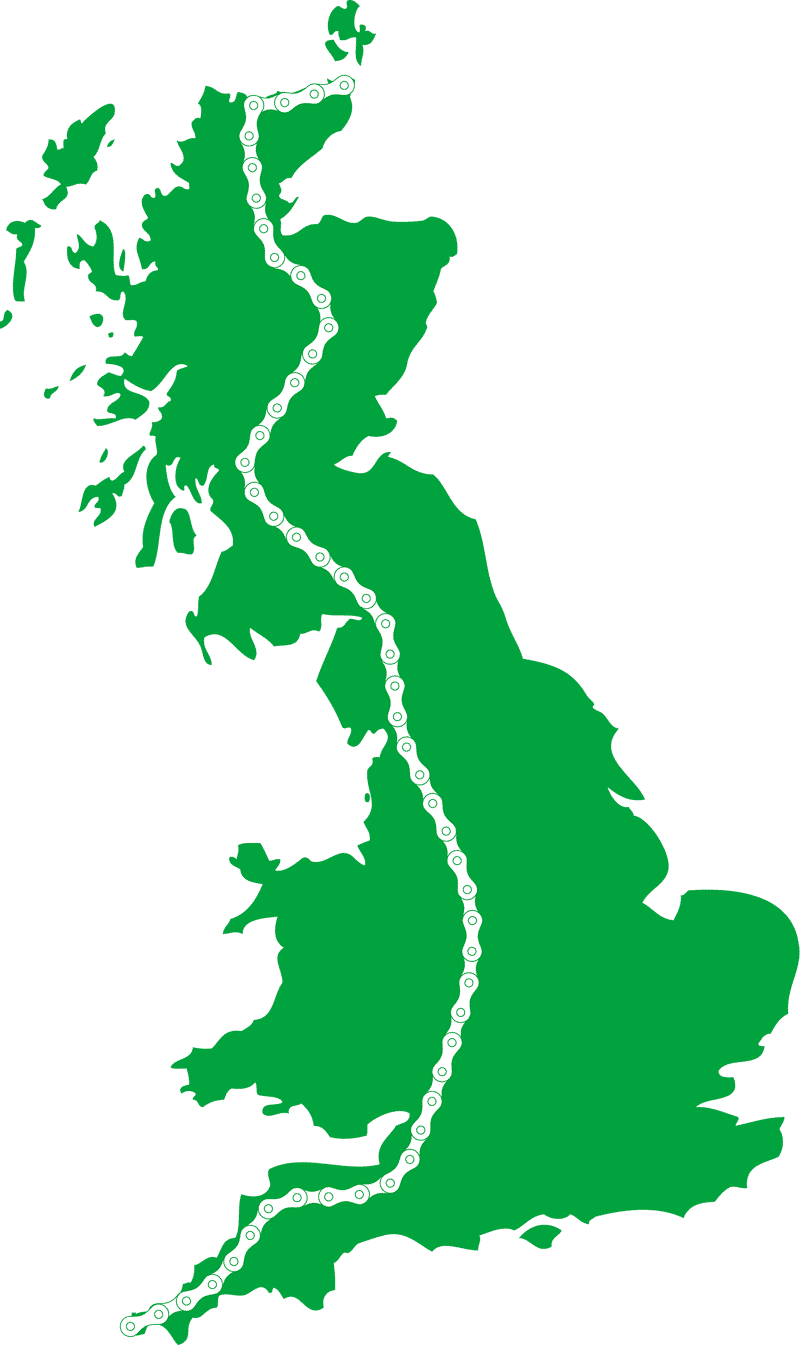
For the UK bike trip, I bought a fabric screen printing kit so I can make custom commemorative t-shirts (jackets, sweatshirts, underwear, whatever). Once the screen is made, it can be applied to anything.

process wank )

The route in the image vaguely approxmiates the route we'll be travelling. In particular, the long gentle curve through the Midlands indicates a lack of firm plans.

The green in the image vaguely approximates the color of the ink I picked up. The kit came with black, red, and yellow, but those didn't seem appropriate to England's green and pleasant land.

So, questions for the artistic types, because I can no longer look at this objectively.
  • Does the design work for you? Does it need text (possibly on a different screen, to print in a different color), e.g. "Three Legs Across Britain"?
  • Does the color work for you? That's easier to adjust than the screen, but I'm hesitant to buy more inks for a very short print run project.
  • Any other thoughts?
kirkcudbright: (Default)
This week's assignment was to "use a reductive process to create an abstract ID or logo from a recognizable image or symbol." This is probably the most abstract thing the instructor has said all semester, and the results can be fairly abstract, but the theory isn't.

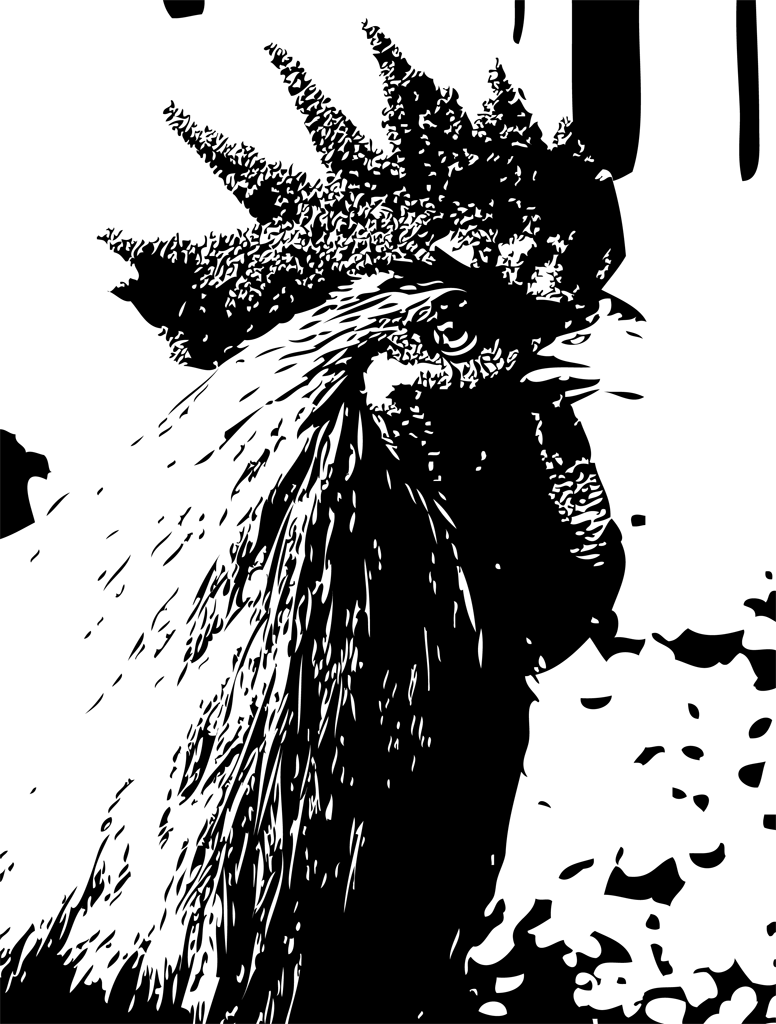
This was the starting image, a championship rooster from the Mother Earth News website.
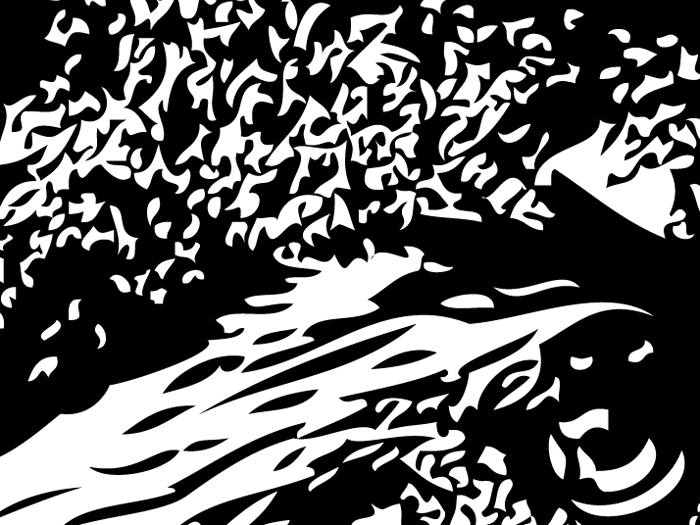
Step 1 is to use Illustrator's Live Trace feature to render the image in flat black & white. I would have removed the background, and played with the Live Trace settings if I was going to use this image in full, but that's completely beside the point of this exercise.
Close up of the eye. I love what this did with the nubbly texture of the comb.

In the end, I decided this was too busy for a logo, and extracted a series of shapes from the neck (lower left corner above).
This is a real company. "Omega Protein Corporation is the largest US producer of fish oil and protein products from menhaden." These are a herring-like fish near the bottom of the food chain, so overfishing at this level has predictable knock-on effects in the Chesapeake and mid-Atlantic. (Mother Jones, Greenpeace, Virginian-Pilot)

Omega doesn't need me to design them a friendly logo (they already have a friendly logo), but this is just what the shapes suggested to me. The thing about this sort of exercise is that I can design a client for the logo, versus the real-world case of designing a logo for the client.
kirkcudbright: (Default)
This was the last project for the Illustrator class (notwithstanding the fact that I executed it in Photoshop).

It doesn't need (or bear) any explanation, beyond the fact that, yes, I did it over the Easter weekend.
kirkcudbright: (pubs)

This semester I'm taking a class in Adobe Illustrator, as part of the graphic design certificate program. I don't usually post about this because a) it's not as exciting as bike wanking, b> I'm not into self-promotion (which is going to be a big handicap if I ever decide to go into graphic design professionally), and/or c] my work, while good enough for the class, isn't as good as I'd like. I mean, I'm taking this class to learn Illustrator, so I'm producing beginner-level work, and who really wants to look at that when you can look at stuff like this instead?

But I was really pleased with this. The assignment, as should be obvious, was to redesign the flag, using the stars and stripes, and the colors red, white, and blue. Oh, and it should express a message of some kind. One of my ideas was to make prison bars (yeah, it's probably been done to death), but I kept coming back to one of the early pictures of Guantanamo, which was shot through razor wire. One thing led to another, and suddenly it's a piece about immigration or something.

It took about 6 hours to create, most of which was two steps forward, two steps back, and a running leap. I deleted everything and started over at least three times. Once I figured out what exactly I needed to do, it took less than half an hour. The secret is to do as little work as possible. One star and its attendant strands of wire are the only real elements here; the endless repitions aren't even copy-and-paste, but smoke and mirrors. The background is from the Photoshop "clouds" filter. It's almost embarrassing how far you can go with so little skill. But it's got 50 stars, arrayed as in the field in the flag, in approximately the right aspect ratio. And it was fun to do.

(BTW, like all the pictures I post, you can click through for a larger version. In this case, you can click through that for larger yet.)

{(
First and most importantly, make the grid. Start with a box the size
of the finished piece: 10.5" x 8". Make it a guide. Pen tool a line
across the top, drag-copy it 9 times, ending on the bottom of the
guide box. Make sure they're aligned, and distribute vertical.
Likewise make 6 columns across. Make a 4x4 grid in the lower left
cell. Subdivide the middle two rows, and subdivide the middle two
rows of that, so you've got lines 0.056" apart at the center.

Create the first curve by dragging the handle of the first point to
the next column line, then down and drag, then back up and drag.
Rotate horizontally as a copy. Select both, stroke to 6 points.
Outline strokes, red fill, black stroke. Divide and un-group. Select
the components of the long "over" stroke, and merge. For some reason,
this removes the stroke, so stroke it again. Do the same for the
other long stroke. With the direct selection tool, remove the "end
cap" segments. Look for an empty (un-stroked, un-filled) lozenge path
for the center, and delete it.

Click the star tool on the center of the cell: Radius 1 0.5", Radius 2
0.13", Points 5. In the layers palette, position it between the two
long strokes, and adjust it vertically to fit in the gap. Group.

Copy the unit group, and position it on the second row, centered over
the left edge of the bounding box (x=0.25"). Use the Transform effect
to make 6 copies at 1.75" horizontal spacing. Use Expand Appearance
to make them all real instances. Un-group the row, then un-group the
leftmost two units. Remove the star from the leftmost one, draw a
vertical line across the wires, and Divide Objects Below. Discard the
paths to the left of the bounding box, merge the truncated paths to
their neighbors, and remove the "end caps". Similarly for the right
edge. This gives us one unit with a left tail, one with a right tail,
and three unmodified units in the middle. For simplicity, I deleted
two of the unmodified units, and used the Transform effect to fill in
their spaces from the remaining one.

Select this second row, group it, and use the Transform effect: Move
Vertical 1.78", 3 copies.

Select the original unit, Transform: Move Horizontal 1.75", 5 copies.
Transform again, Move Vertical 1.78", 4 copies.

Make the background in Photoshop. New document 10.5" x 8" x 100dpi.
Foreground white, background medium blue, and use the Clouds filter.
Do it again if you don't like the first one. Save as psd.

Back in Illustrator, make a new layer behind the vector artwork, and
place the clouds image. Center it, and you're done.
)}
kirkcudbright: (Default)
In the past three days, I've delivered to the printer the Arisia Souvenir Book and Program Guide. The PG is an insert into the book, with the long program item descriptions and participant bios. Really, it was Skip's project, but I had to take over at least the delivery, in order to ensure that it matched the style and production values of the book. So I was up all night, taking changes up until 7:30, delivered to the printer's ftp site at 7:45.

Between the two, I've gotten maybe 3 nights sleep over the last week, and I'm coming down with a sudden (but well-timed) cold right now.

Check it out.


I wouldn't ordinarily repeat something that I've linked to (albeit indirectly), but here is the workflow for the Program Guide:

1. Jack runs a couple reports on Zambia, one for the program descriptions, one for the bios.

2. He saves them to disk, opens them in Excel, performs some manipulations to strip out the html, saves them as CSV, and mails them to Skip.

3. Skip runs the csv files through a TECO filter to convert the line breaks from naked carriage return (I'm guessing Jack's on a Mac), plus other unspecified manipulations.

4. He runs the output of that through a DCL filter for more perl-like manipulations. This creates a SQL/Access-like database on the VAX, from which he generates a pair of html files. (This database also generates the CSV files for the Pocket Program, and a (different?) CSV file for the Palm Schedule.) He posts the pair of html files on his website, and sends notification email.

5. I download the html, and hand-apply some corrections I know about. (I could have just run it through diff3|ed to merge changes. Oh well.)

6. I run the patched html through a perl filter to do further manipulations and corrections, some based on demoroniser, but many specific to the way I want the text formatted. This generates yet another pair of html files.

7. InDesign can't import html directly, so I open the html in Word and save it as doc. While I'm in there, I change all paragraph styles "Normal (Web)" to "Normal".

8. By this time, I've already set up the InDesign document, and specified how I want the styles "Normal", "Heading 3", and "Heading 4" to be formatted. The doc files are "linked" to the InDesign document, so if I update the doc, I just tell InDesign to re-link, and it re-imports the files in situ, with the InDesign formatting instead of the Word formatting.

9. Then I apply Eyeball Mark 1, and tweak the formatting of individual paragraphs as needed. When I'm reasonably satisfied, I export it as pdf, and post the pdf and the corrected html to my website.

10. For last-minute changes, I edit the "source" html (from Skip), and repeat steps 6-9. The actual time from editing the input html file to posting the pdf output is about 5 minutes.

Rube Goldberg would be proud.

kirkcudbright: (Default)
If you're at all curious about what I've been up to the last few weeks, check out the proofs of the Arisia Souvenir Book. It's at the printer now.

press

Jun. 14th, 2005 05:50 pm
kirkcudbright: (Default)
This past weekend, I took a Letterpress Printing course at Montserrat College of Art in Beverly MA (course details about halfway down this page). This was a lot of fun, and I'm going to have to do more of it (when I have a project that it would be appropriate for). After all this time, it was so cool to be working with actual type, and actual leading, and applying ink to type, type to paper.


pictures and commentary )
kirkcudbright: (pubs)
The Photoshop course started today. We were just going over the syllabus, when who should walk in (late) but [livejournal.com profile] c1. I had no idea he was also doing the Graphic Design certificate program (I mean, he graduated from art school), but there you are.

Before class, I dropped in on the typography class, which I'd taken last semester, to give the instructor a copy of the Arisia souvenir book. She was also pleased with how it came out, so my head's pretty big right now.
kirkcudbright: (pubs)
I signed off on the proofs of the souvenir book, and the printers are printing it. And I have this irrational lurking fear that there is some mistake so massive and bone-headed that I and everyone have failed notice it (a la "ConDigeo").

Profile

kirkcudbright: (Default)
Paul Selkirk

August 2019

S M T W T F S
    1 23
45678910
11121314151617
18192021222324
25262728293031

Syndicate

RSS Atom

Most Popular Tags

Style Credit

Expand Cut Tags

No cut tags
Page generated Mar. 14th, 2026 11:25 pm
Powered by Dreamwidth Studios